
ADA Title II and classroom tools: what school districts need to know


A sixth grade English teacher posts the week’s reading to the class page on Sunday night. It’s a scanned chapter from a textbook the school has used for years. On Monday, a student who uses a screen reader opens the file and hears nothing. The page is an image of text, so there’s no text to read. The student waits for a classmate to read it aloud.
This is the situation ADA Title II addresses. Title II of the Americans with Disabilities Act (ADA) covers state and local governments, and the Department of Justice (DOJ) now has a rule that sets a technical standard for their web content and mobile apps. Public school districts are included. For district technology leaders, that turns a long-standing expectation into a dated one, and it reaches well past the district homepage. It reaches the learning platform, the documents inside it, and the tools students open every day.
This post covers what the rule requires, how to find your deadline, what it means for classroom tools, and where to start.
What ADA Title II requires of school districts
In April 2024, DOJ published a rule requiring state and local governments to meet Web Content Accessibility Guidelines (WCAG) 2.1 Level AA for their web content and mobile apps. WCAG comes from the World Wide Web Consortium (W3C). Despite the word “guidelines” in the name, meeting it is mandatory under the rule.
In a school setting, Level AA means captioned videos, text alternatives for images, documents that work with screen readers, and pages that students can navigate with a keyboard instead of a mouse.
Two details catch districts off guard. The rule covers mobile apps, not only websites. And bringing in an outside vendor doesn’t move the responsibility. According to DOJ guidance on ADA.gov, a district remains responsible for the accessibility of its web content and mobile apps even when someone else does the work.
ADA Title II deadline: which date applies to your district
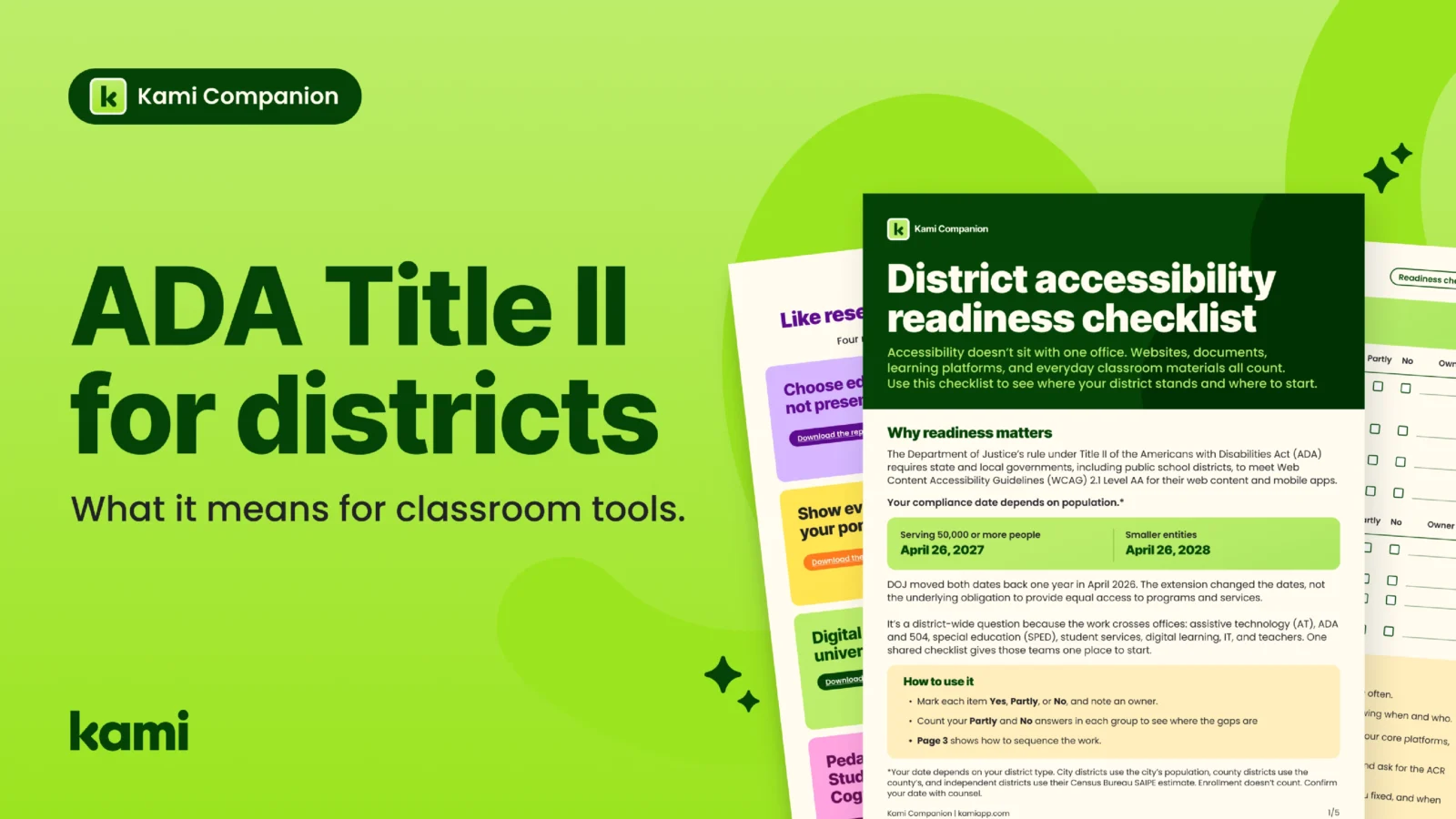
DOJ extended both compliance dates by one year in an April 2026 interim final rule. Your date depends on the population your district is measured against.
| Population | Compliance date |
|---|---|
| 50,000 or more | April 26, 2027 |
| Fewer than 50,000, or a special district government | April 26, 2028 |
Population here doesn’t mean enrollment or headcount. For an independent school district, DOJ points to the district’s population in the Census Bureau’s 2022 Small Area Income and Poverty Estimates. Some districts are classified differently under state law, so confirm yours with counsel before you build a plan. The ADA Information Line can also help if the numbers aren’t clear.
The extension moved the dates. It didn’t change the underlying obligation to give students equal access to programs and services, and the work doesn’t end on the deadline. Districts have to keep conforming afterward.
What ADA Title II means for classroom tools
Most coverage of the rule focuses on the district website. The classroom is where the volume is. ADA.gov is direct on this point: there’s no exception for educational course content. If a school uses a learning management system (LMS), it generally needs to make sure the LMS and all the course content added to it meet WCAG 2.1 Level AA. When a teacher posts a link to required reading, that link and the reading generally need to meet it too.
Course materials rarely qualify for the document exception
The rule exempts “preexisting” conventional electronic documents, such as PDFs, slides, and spreadsheets, posted before the deadline. That exception doesn’t cover documents students currently use to participate in a program or service. A reading students use to take a course is used to participate in that course. Last year’s board minutes might qualify. This week’s reading doesn’t, and neither do materials posted after the deadline.
Tools you license are still your tools
DOJ’s own example involves a township that uses a third-party app to pay for public parking. The township didn’t build the app, but it provides the app to residents through a contract, so it has to choose one that meets WCAG 2.1 Level AA. The same logic applies to a district that provides a classroom tool through a contract or license. Choosing the tool is part of the obligation.
Exceptions don’t end the obligation
The rule has five exceptions: archived web content, preexisting conventional electronic documents, content posted by unaffiliated third parties, individualized password-protected documents, and preexisting social media posts. Each has narrow conditions. Even when one applies, a district still has to give a student content in an accessible format when they need it. A student who relies on text-to-speech needs the reading to work whether or not the file technically qualifies.
Web-based curriculum is where the gaps hide
Much of what students read now lives on the web: publisher curriculum sites, digital textbooks, assessment portals, and the articles teachers link to. A district can ask vendors for conformance, but it can’t rewrite every page students open. Meanwhile, supports listed in an individualized education program (IEP) or Section 504 plan have to work wherever the student works, not only inside one approved tool. When supports stop at the edge of a single platform, the student is the first to notice.
How to vet classroom tools for WCAG 2.1 AA
Start with the vendor’s Accessibility Conformance Report (ACR). Ask for a current one for every tool, and read the full report, including where it shows partial support and known gaps. A report only helps if someone reads past the summary.
Then test. ADA.gov notes that automated tools can’t check every aspect of accessibility, so districts need a mix of automated and manual checks. For a classroom tool, a manual check can be as simple as completing a typical student task with only a keyboard, then again with a screen reader.
Contracts come next. In public comments on the rule, DOJ heard about practices that some public entities found helpful. Some require detailed accessibility information before signing a contract. Others ask vendors to warrant that the product meets technical standards, and they don’t let vendors disclaim that warranty. Some also require vendors to cover the costs if the warranty is breached. DOJ doesn’t endorse any one approach, but the list gives procurement teams a place to start.
Finally, make the review routine. Check accessibility whenever you add, renew, or retire a tool, and keep a record of what you tested, what you fixed, and what’s scheduled.
ADA Title II compliance checklist for school districts
You can’t fix everything at once, so sequence the work by who’s affected and how often.
First, confirm your date and name an owner. Every other decision depends on knowing when and who. Second, fix what students and families use every day: your key pages, your core platforms, and the 20 document types teachers and offices use most. Third, stop adding to the backlog. Build new content accessible from the start, and ask for the ACR before you buy a tool. Fourth, schedule the rest and keep a record of what you tested, what you fixed, and when the remaining work lands.
We built a checklist to make this concrete. The district accessibility readiness checklist has 20 items across five areas: scope and ownership, websites and apps, documents and course materials, learning platforms and web-based learning, and vendors and records. Mark each item Yes, Partly, or No and note an owner. The area with the most Partly and No answers is where to begin.
Download the district accessibility readiness checklist:
For the dates at a glance, see the compliance timeline one-pager:
Where Kami helps
Readiness is a district effort, and no product makes a district compliant. That depends on how a district creates its content, chooses its tools, and manages its whole digital environment. Kami supports the daily access work inside it.
Kami Companion makes web-based learning accessible so more students can participate independently. It adds built-in reading, language, and expression supports across online content and curriculum, so learners can have text read aloud, adjust reading levels, translate, and capture ideas by voice on the same pages their peers use. That speaks directly to the gap above: supports that follow the student across the web instead of stopping at the edge of one tool, without separate tools or constant teacher intervention. Companion adds supports on the student’s side. It doesn’t change the underlying page, so it doesn’t replace a district’s responsibility to choose and maintain content that meets WCAG 2.1 Level AA.
Two other Kami products touch the same work. Kami App turns the worksheets, PDFs, and scanned pages teachers already use into interactive documents with built-in accessibility supports such as text-to-speech and annotation, and it’s certified by CAST for Universal Design for Learning (UDL). Book Creator gives students more than one way to show what they know, and it’s UDL certified by CAST as well.
Kami publishes an Accessibility Conformance Report and a WCAG 2.1 Level AA conformance letter for Kami App, Book Creator, and Kami Companion. Ask for them, and read them the way this post suggests you read any vendor’s. Visit Kami’s accessibility page for more details on our accessibility alignment.
Start with one shared page
Bring your completed checklist to the next meeting of your ADA, 504, special education, and digital learning teams. Gaps look different when everyone reads the same page. If you’d like to talk through your district’s access needs, talk to our team.
This post is a planning aid, not legal advice. Confirm dates and requirements with counsel.
Blogs you may also like

Kami Companion and UDL: how built-in supports bring the framework to life

Accessible documents: a teacher’s guide to WCAG 2.1 AA | Kami
Text to speech Chrome extension for school: how AT teams evaluate one