Every student, the same lesson, the same day
Kami builds accessibility into the materials teachers already use, so students get what they need without a separate file, a separate app, or a separate moment.
Why accessible learning is harder than it should be
When materials aren’t designed for the full range of learners in a room, teachers become the workaround.
A screen reader with nothing to read.
A student who uses a screen reader opens an inaccessible document and has to wait for a separate accommodated version.
One lesson, three parallel versions.
Building a version for a student two grade levels behind, another version for a multilingual learner, and a third version for a student with an IEP isn’t sustainable.
Support that singles students out.
When accessibility means a separate app or a visibly different assignment, students lose independence and confidence, along with access.
Compliance is the floor. Belonging is the goal.
Designed for learner variability from the start
Kami helps schools design for the range of learners already in the room, rather than retrofitting access after the lesson is built.
Teach and assign
Turn the materials teachers already use into something every student can access and respond to directly.
Support every learner
Bring reading, language, and focus support into the assignment itself, so no student needs a separate tool to keep up.
Create and express
Give students more than one way to show what they know: writing, voice, video, or drawing.
See accessible learning in action
The same worksheet, the same day
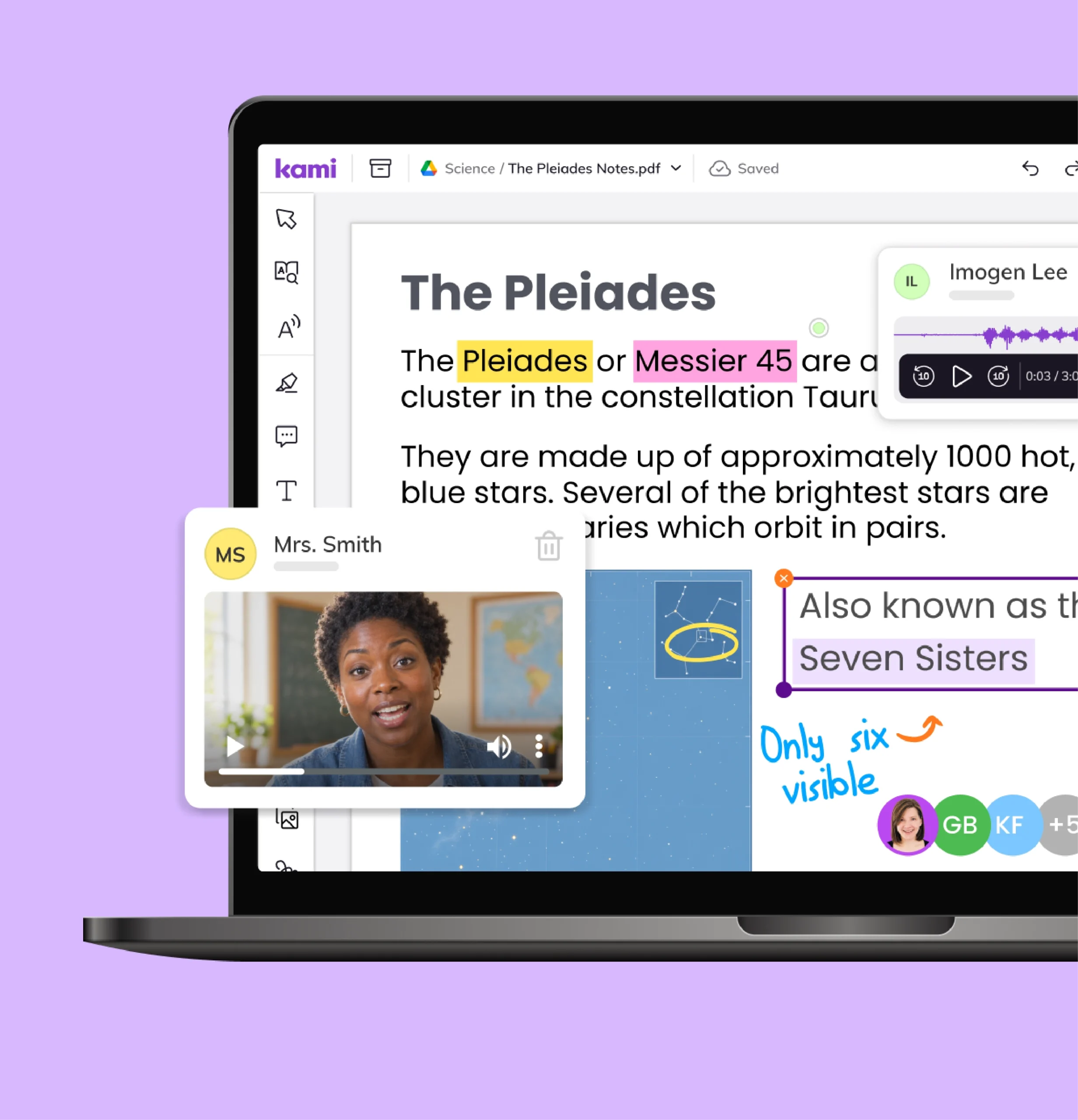
With Kami App, a student using a screen reader opens the same digital worksheet as the rest of the class, with the same due date. Not a separate accommodated version built later.
Support that stays on the page
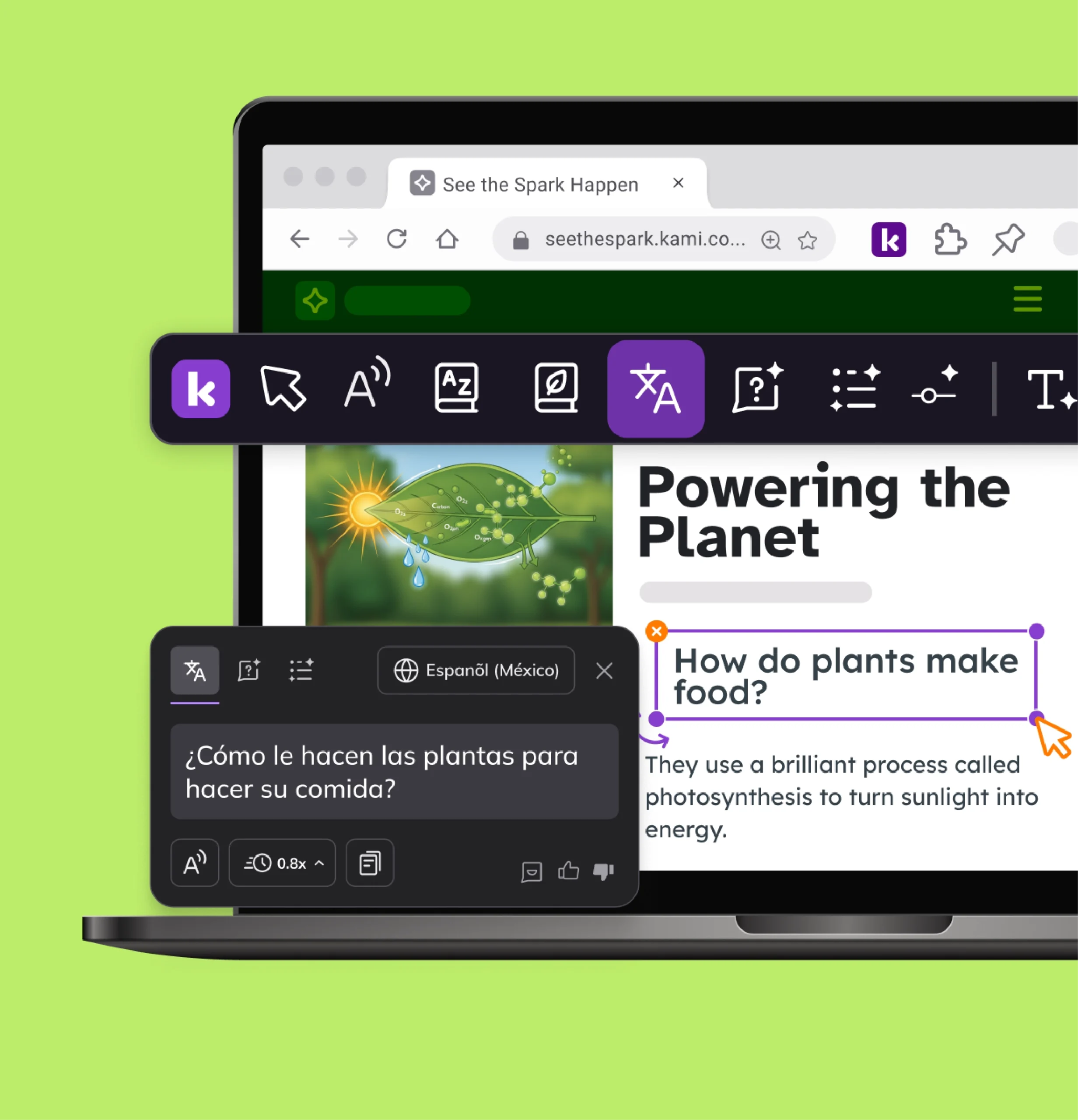
With Kami Companion, a multilingual learner adjusts the reading level and gets translation support directly on a web-based assignment, without leaving the page or opening a separate app.
More than one way to answer
With Book Creator, a student who finds writing difficult shows what they know through voice, video, or drawing instead, in a project they’re proud to share.
Feedback in more than one form
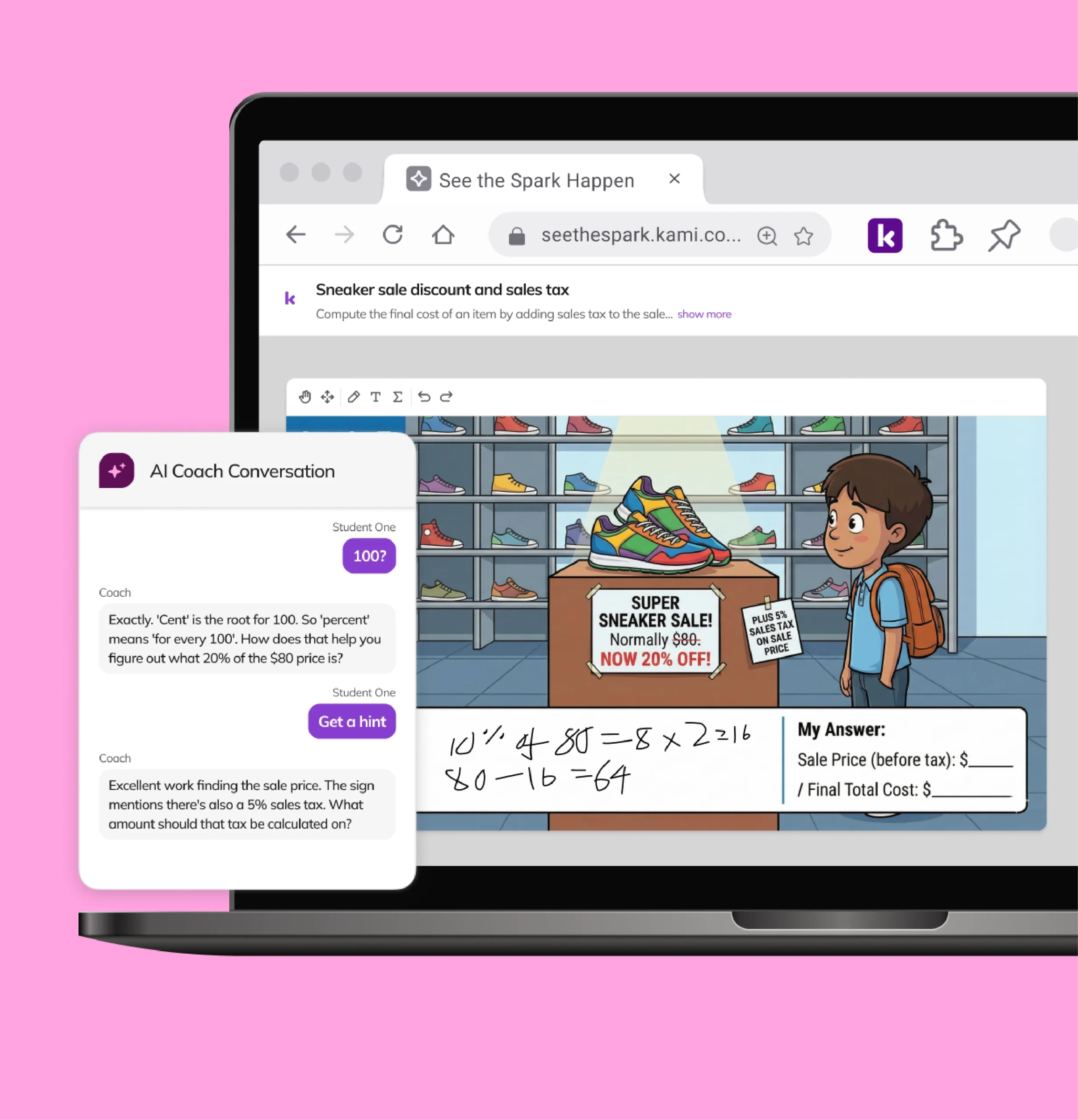
Kami Coach adds a math-specific version of the same idea: students work a problem on an open canvas and get feedback on their reasoning as they go.
Kyle McKoy, Program Specialist for Special Education, Peak Prep
Independent access to grade-level work
Kyle describes how a student at Peak Prep completed an entire history assignment on their own, using Read Aloud, Simplify, and talk-to-text. Those supports used to depend on a person being there.
Trusted by 50+ million teachers and students worldwide




Built around Universal Design for Learning principles
Organized to support how students engage, understand, and express what they know.
- Read Aloud, with adjustable voice and speed, so students can hear any text read back to them
- Graphic organizers, so students can see and structure information visually before writing
- Equation tool and text recognition (OCR), turning formulas, symbols, and scanned pages into something every student can read
- Translate tool with an eight-language dashboard, so students and families can work in a language that feels familiar
- Dictionary, Picture Dictionary, and Multilingual Dictionary, so students get instant definitions without leaving the document
- OpenDyslexic and Lexend accessibility fonts, so students who process text differently can choose the typeface that works best for them
- Closed Captions on videos, so students who are deaf or hard of hearing can access video content alongside their peers
- Dark Mode, Invert Colors, and Screen Masking, so a student can change how a document looks without changing it for anyone else in the class
- AI-powered summaries and explanations, to support comprehension alongside decoding
- Screen Masking, to reduce visual clutter on a page so students with focus or processing challenges can concentrate on one section at a time
- Read Aloud and adjustable reading levels, so students access the same web-based content at the level they need
- Translation across 100+ languages, directly on the page, so multilingual learners can access content in their home language
- Graphic organizers and templates, so students can structure and organize their thinking before writing
- OpenDyslexic accessibility font, so students with dyslexia can read in a typeface designed to reduce letter confusion
- Translate, to make books accessible in 100+ languages, so every student can engage with content in the language they understand best
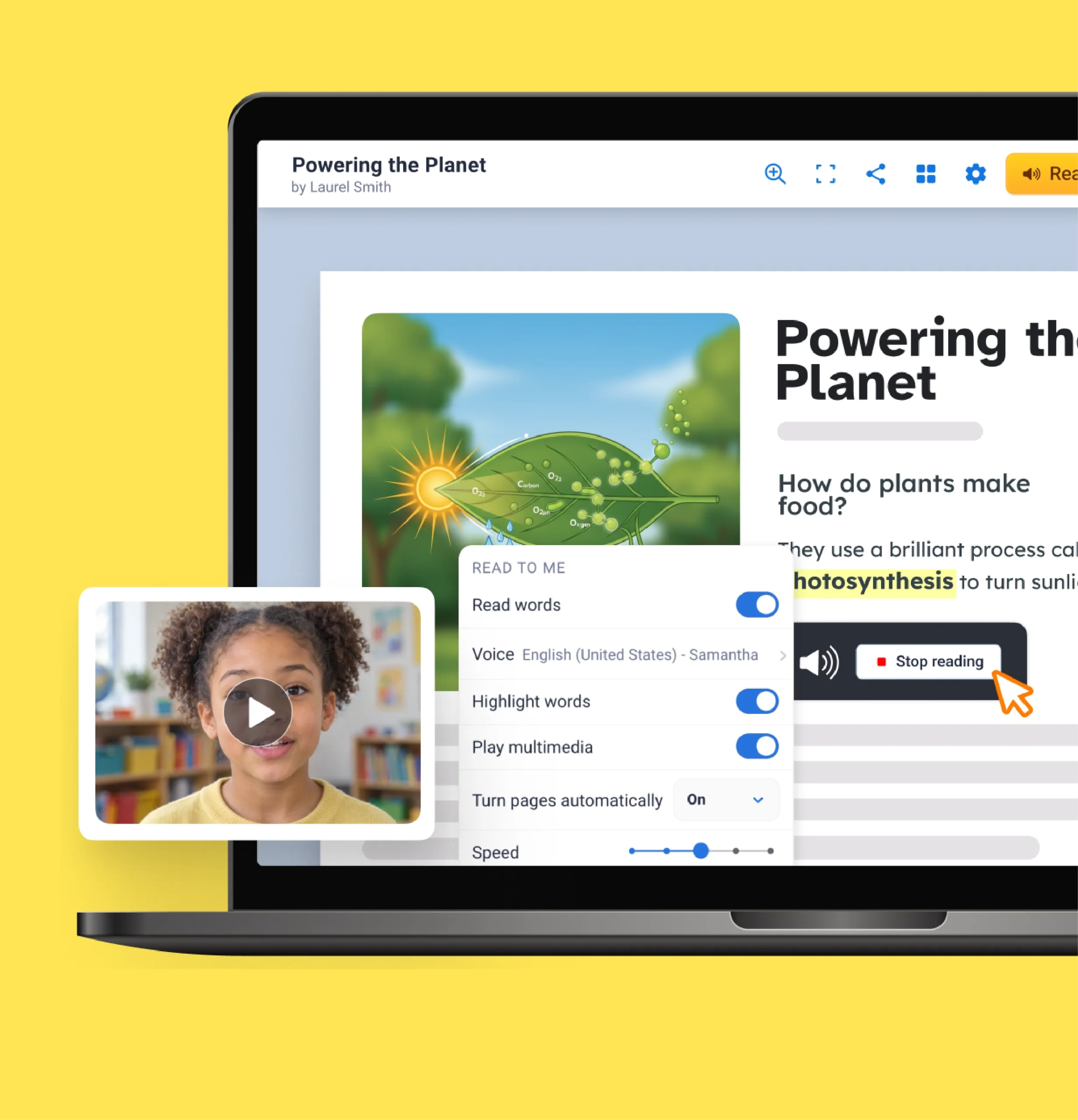
- Read Aloud (Read to Me), with adjustable speed, language, and accent, so students can hear text read back to them at a pace that works for them
- Captions on videos, translated into 120+ languages, so students can access video content in the language they need (limited on the Starter plan)
- Box Highlighter, so students can focus on one section of a page at a time and reduce visual distraction
- Real-Time Collaboration, so students can work alongside peers and see contributions as they happen
- Relevel, to adjust a text's reading complexity up or down, so students engage with grade-level content at the right entry point
- Feature Control, to turn specific tools on or off for a given assignment or student, so each learner has only the supports they need
- Real-Time Monitoring and Class View, so a teacher can see live student work and step in while the lesson is still happening, not after it's turned in
- Predictive Text, prioritizing high-frequency and phonetic misspellings so students can focus on ideas over mechanics
- Open in Kami, to turn any web page into an interactive Kami activity, so students engage with online content rather than just reading it
- Pen highlighter, so students can mark and interact with text directly on the page
- Real-Time Collaboration, so multiple students can work on a single book together while a teacher monitors progress
- Class View, so a teacher can see live student work across the class and respond to who needs support in the moment
- Library settings, so teachers control which templates and shared libraries students can access, reducing decision fatigue for learners who need more structure
- Voice Typing, so students who find writing difficult can compose by speaking instead of typing
- Voice Comment, Video Comment, and Screen Capture Comment, so students can explain their thinking out loud instead of only in writing
- Drawing, Shapes, and STEM tools, for hand-based input on tablets and Chromebooks, so students who communicate better visually can show their thinking
- Voice Typing, so students can dictate directly into their work without switching tools
- Voice Comment and Video Comment, so students and teachers can give feedback or explain thinking in spoken or recorded form
- Multimedia books that combine text, image, audio, and video, so students who show what they know better in a different form have a genuine alternative to the written essay
10:30-11:30 AM
Frequently asked questions
Browse our FAQs below, or visit our Help Center for comprehensive guides and troubleshooting support.
Does Kami meet WCAG 2.1 AA accessibility standards?
Kami App, Kami Companion, and Book Creator are each aligned to Web Content Accessibility Guidelines (WCAG) 2.1 AA. Each product has a VPAT, an accessibility conformance statement, and an accessibility roadmap. See the accessibility page.
Does Kami help my district meet the ADA Title II web accessibility rule?
The rule requires WCAG 2.1 AA conformance by April 26, 2027 for entities serving 50,000 or more people and April 26, 2028 for smaller ones (Department of Justice). A conformant tool is one input into a district’s overall review, since the rule covers its whole digital footprint. See Kami’s accessibility documentation.
Can Kami support a student's IEP or 504 plan?
Kami’s built-in supports, such as read aloud, dyslexia-friendly fonts, and captions, give students access to the same materials as classmates without a separate accommodated file. Your IEP team decides how features map to a student’s plan under IDEA Part B. See the accessibility page.
Do students need separate apps for different accessibility needs?
No. Accessibility tools live inside the materials teachers already use in Kami App, Kami Companion, and Book Creator.
Which Kami products include accessibility features?
Support is built across the family. Kami App makes instructional materials interactive and accessible, and Kami Companion brings reading, language, and focus support to web-based content. Book Creator adds multimodal ways for students to create and express learning. All three are designed with CAST’s UDL Guidelines in mind.
See what Kami can do for your school