
Kami Companion: proven classroom accessibility tools that empower districts to deploy at scale


How one assistive technology toolbar gives every student independent access to grade-level content.
A district can do everything right, from investing in high-quality curriculum to hiring dedicated specialists, but the reality is that students can still be left stranded in the classroom.
A student opens a dense online science article. The vocabulary is impenetrable. Across the room, a multilingual learner hits a wall of text in English. A third student loses their place every time the page scrolls. The teacher wants to help all three simultaneously — while still ensuring high-quality learning is happening.
Accessibility, when treated as a human-dependent resource rather than a system-wide solution, breaks down precisely when students need it most. The burden falls entirely on the educator to be in three places at once, and no budget or staffing model can solve that math.
Kami Companion is a Chrome and Edge browser extension, an assistive technology toolbar that adds accessibility support directly onto web-based resources students already use. It shifts support from a person-dependent model to one that supports all learners in every classroom, every day — without adding another platform for teachers to manage.
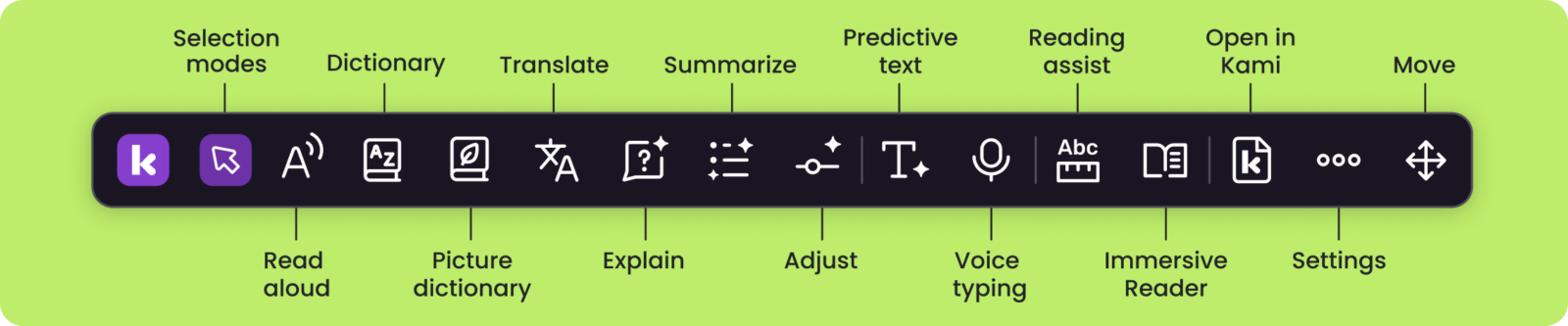
What an assistive technology toolbar looks like in practice
For Kyle McCoy, Program Specialist at Peak Prep in Southern California, the challenge is familiar. How do you give one hundred and fifty students the individualized support they need when there are only so many adults in the room?
“All of those levels of accommodations and support that previously relied on a person, now Kami can do with that student directly. They get to pull up a toolbar on their computer and have access to these things right there in front of them.”
Students at Peak Prep reach for support without waiting to be prompted. That kind of independence is the point.
Evidence also supports the approach. A Johns Hopkins University study found that multimodal learning produced significantly higher content — with gains still measurable four months later. The AEM Center, a US Department of Education initiative, highlights inclusive design as a predictor of long term academic success.
See how Kami Companion could work in your district ↓
An assistive technology toolbar that supports the ways students learn
District leaders need three things from any accessibility tool: support that works across online resources, consistent access for diverse learners, and tools that help meet accessibility expectations without adding more work for teachers.
The Kami Companion toolbar delivers support across three strategic pillars:
Reading and Comprehension Support
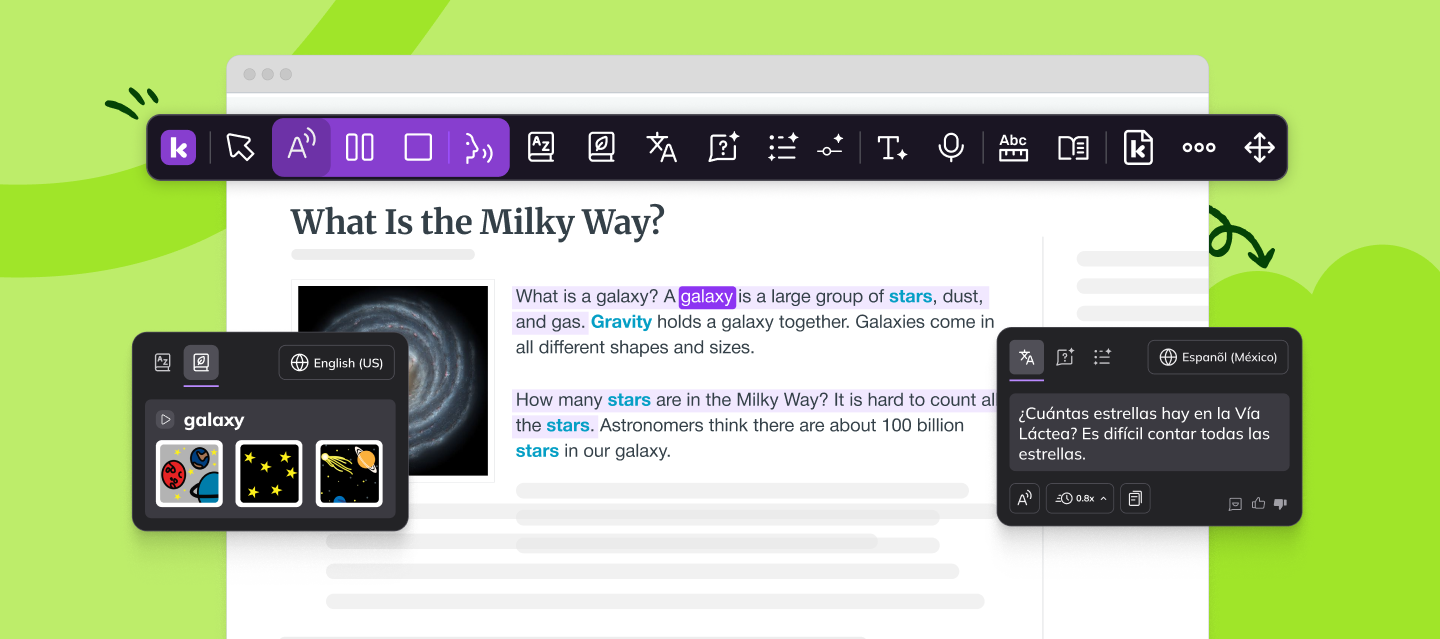
- Read aloud provides high-quality text-to-speech with adjustable playback speed and natural-sounding voices, supporting auditory learners and students with decoding challenges.
- Adjust dynamically simplifies complex syntax and vocabulary so students can access grade-level content without losing its core meaning.
- The Explain and Summarize tools use safer-AI to break down difficult concepts or provide an immediate overview of long-form text.
- Translate supports multilingual learners with real-time access to Tier 1 curriculum in dozens of languages.
Focus and Sustained Reading Support
- Screen masking reduces visual overstimulation by “masking” or covering sections of text that students aren’t actively reading.
- The Reading ruler provides a digital guide for students with attention or visual processing need who lose their place on a page.
- Immersive Reader strips away web noise to present content in a clean, distraction-free environment — critical for students who cannot sustain attention on busy digital layouts.
Expression and Writing Support
- Voice typing allows students to dictate responses by removing the barrier of physical typing or spelling for students who have strong ideas but struggle with written expression.
- Predictive text helps students write sentences faster and with greater confidence, keeping them engaged in the writing task.
What Kami Companion usage can look like at scale
Across forty thousand plus students, Companion usage reflects the same pattern. Students reach for supports when they need them, without waiting for a teacher prompt.
- Read aloud: 800,000+ moments where students heard text to support reading
- Adjust: 295,000+ times students changed reading levels
- Translate: 220,000+ uses to keep multilingual learners in the room
These numbers represent time that was returned to the teacher for instructions. They also represent a district-wide shift: from accessibility as a reactive fix to a proactive foundation for student agency in learning.
Forty thousand students are already using these tools independently. See what that looks like for yours → Book a 30-Day Trial.
The 2026 compliance reality district leaders cannot ignore
Federal mandates now require accessibility across all digital instructional materials — including the web-based resources students use every day. Compliance deadlines are in effect, and districts that act now will be ahead of them, not scrambling to catch up. Kami Companion provides a consistent accessibility layer, an assistive technology solution, across that web-based content, ensuring students have the tools to access materials even when the source itself is not fully compliant.
Kami Companion is fully compliant with COPPA, FERPA, SOPPA, SOPIPA, and SOC 2 Type 2 and WCAG 2.1 aligned. Kami Companion does not harvest or sell student data, it reads online content in real time to deliver accessibility support. Kami applies AI with strict ethical commitment and responsibility.
For a full picture of how student data is handled, see the General Data Privacy Policy and Terms of Service.
The strategic case for district-wide access
Every line item in a tightening budget needs to be tied directly to student outcomes. Kami Companion consolidates what would otherwise be a patchwork of tools and extensions into a single, centrally managed toolbar — deployed via Google Admin Console or Microsoft 365 admin center without tech stack troubleshooting.
Common district challenges and how Kami Companion helps
| The challenge | What it means for your school | How Companion helps |
| Legal and compliance risk | Accessibility expectations now apply across digital instructional materials. | Students can access an accessibility toolbar on web based resources they already use. |
| Budget Consolidation | Every line item needs a clear purpose. | Replaces multiple extensions with a single, district managed tool set. |
| Equity in outcomes | Students with disabilities and multilingual learners need access without separation. | Supports reading, language, focus, and writing supports in the same workflow as peers. |
| Reading and literacy pressure | More students are working with complex, web based texts. | Read aloud, Summarize, and Adjust help students access content at an appropriate level. |
| Limited adult support | Teachers cannot provide one to one support at every moment of need. | Students can self serve support tools while staying in the learning task. |
Whatever’s on your list, there’s a good chance Companion already solves for it → Book a 30-Day Trial for Your District.
When you invest in Kami Companion, you’re not purchasing a single accessibility feature, you’re reallocating teacher time back to students and building a support infrastructure that scales impact without additional administrative burden.
See how Kami Companion supports district accessibility requirements:
Download the report | Get in touch today
Blogs you may also like

An Educator’s Journey with Kami

Engaging every learner: How Kami transforms passive lessons into active learning
One platform, every learner: How Fond du Lac School District transformed digital learning with Kami