
A classroom pen pal program that connects your students to the world


When students know someone outside their school will read, respond, or create alongside them, the work changes. A writing prompt becomes a message. A research task becomes a story worth telling. And a project that felt like “just for a grade” starts to feel like it matters.
Teachers and librarians are often the ones making that kind of learning possible. You’re the connector, the organizer, and the person keeping the experience safe and manageable.
The Global Pen Pal Project is a classroom pen pal program built for real school calendars. This post explains how it works and how to sign up. The teacher guide and the match-maker form are open to everyone, so you don’t need to join anything first. Completing the match-maker form signs you up and opts you into the Kami Community, where program updates, the resource library, and other participating teachers are.
What a classroom pen pal program looks like
A classroom pen pal program connects your students with a partner class in another location, usually as part of a wider global collaboration project. Students collaborate through shared artifacts, peer feedback, co-created books, or structured exchanges across a set timeline.
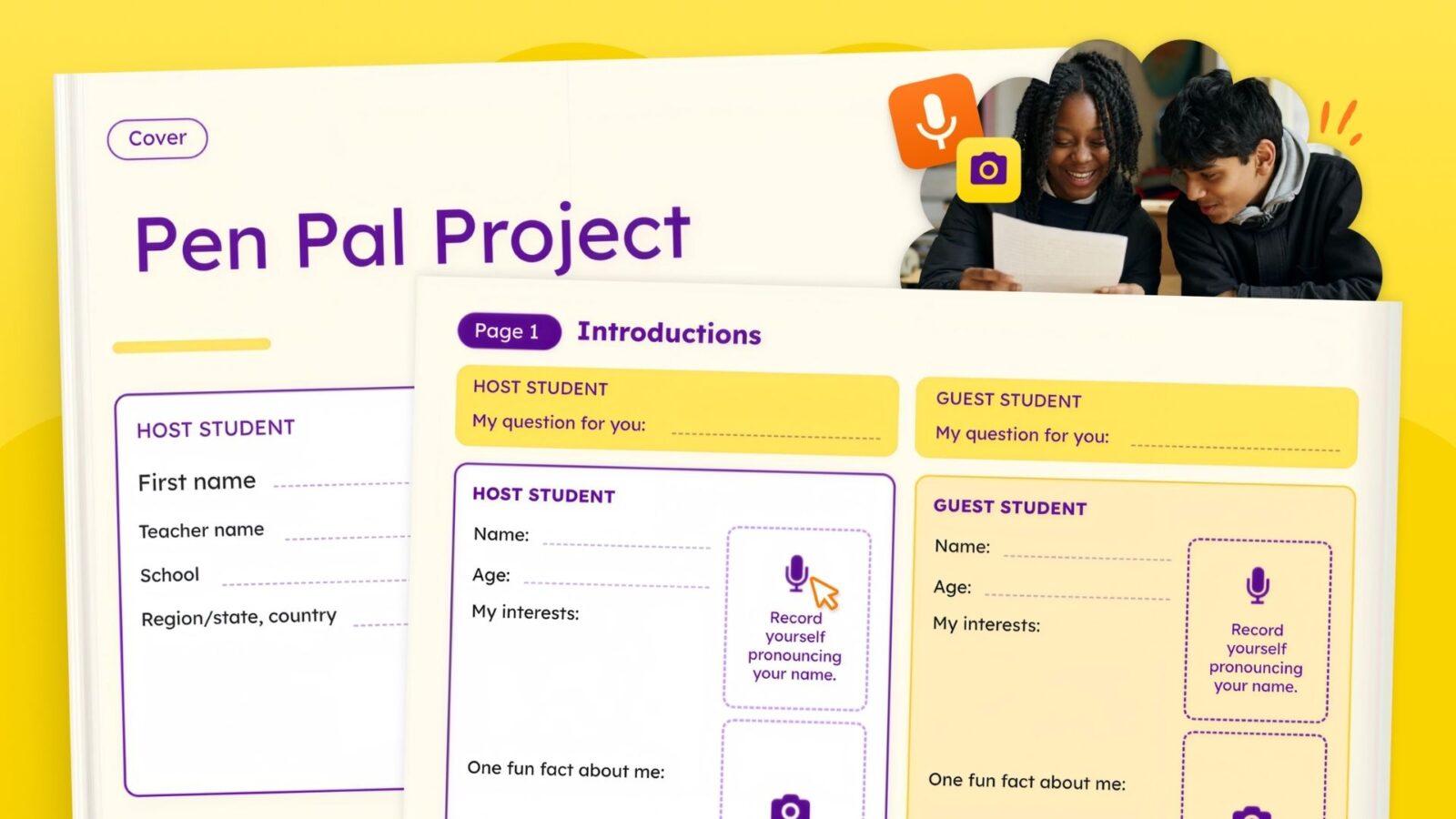
In the Global Pen Pal Project, students collaborate inside a shared Book Creator book. Each book pairs one student with one peer in another school, and the activity book comes ready to use: a cover, four pages, and an optional reflection page. Students complete the cover in the first few minutes of week 1, then run one page a week across four weeks.
The book is built so that a pair can’t finish it in parallel. A strip at the top of every page carries the question a student is answering and the one they’re asking next. Page 1 asks. Pages 2 and 3 answer last week’s question and hand a new one forward. Page 4 answers, and stops, because the exchange is closing. Neither student is only responding, and neither can fill in the strip without reading their partner’s page.
The optional reflection page closes the book. Each student looks back across their partner’s four pages and answers three questions: what surprised you, what do you have in common, and how are you different.
Why teachers and librarians run a classroom pen pal program
Those design choices aren’t decoration. Here’s what they produce in a classroom:
- Writing with a real audience, because a named partner reads the page and answers it the following week.
- Questions that get sharper, because each student hands one forward three times across the four pages.
- Speaking as well as writing, because three of the four pages carry voice recordings, so a student who finds writing hard still has a full route through the book.
- An ending rather than a fade-out, because the reflection page asks both students to name what surprised them and what they found in common.
- One project the classroom and the library can share, because both run from the same book on the same weekly rhythm.
- Global competence you can actually assess, because it happens with one named partner across four weeks rather than in open-ended posting.
Those are patterns teachers report, not guarantees. Book Creator, which the project runs inside, holds Level III evidence certification under the Every Student Succeeds Act (ESSA) for improved learning outcomes in English language arts.
Match-making Window 1 closes September 25, 2026. Read the teacher guide if you want the weekly pacing and the full commitment before you decide, or complete the match-maker form now.
What students actually make
You don’t need to design the activities. The project ships as one Book Creator template that works across K-12. Every image prompt can be answered with a drawing rather than a photograph, and three of the four pages carry voice recordings, so emergent writers and multilingual learners have a route through the book that doesn’t depend on long written answers. Teachers can also choose to do their own activity or modify ours.
The pages in order:
- Cover: Pen Pal Project. Both students add a first name. Teachers add their own names, schools, and locations, so the book reads as a correspondence between two classrooms.
- Page 1: Introductions. An image of yourself, a few short details, and a recording of your own name, so your partner hears it before they try to say it. Then one question for your partner.
- Page 2: Where we are from. A map of your city, a famous landmark, the food you eat, and a few facts about your community. Answer your partner’s question, then ask a new one.
- Page 3: Favorites. Two recordings, one on your favorite sport, holiday, or animal and one on what you do with friends in your free time, plus an image of your favorite meal.
- Page 4: More about me. Choose one of three prompts, a special talent, a place you love, or the people who matter to you. Add an image and record yourself describing it, then answer your partner’s last question.
- Page 5: Reflection, optional. What surprised you, what you have in common, and how you’re different.
Every route through the book leads to the same book. Students who draw instead of photographing, or record instead of writing at length, complete the same pages their partner does, so multilingual learners and students with disabilities aren’t working from a separate version. The short prompt lines and the weekly question do need writing, so plan for a scribe or speech-to-text where a student needs one. Book Creator holds Universal Design for Learning (UDL) Product Certification.
What you still decide is which four weeks in the project window carry the pages, whether voice recording is approved for your students, and how you pair everyone if your two class sizes don’t match. If one student needs two partners, they work in two books and you copy their pages across, which the teacher guide walks through.
Keep the pen pal exchange safe and teacher moderated
Decide the boundaries before the first page goes out. First names, nicknames, or initials only, and full names only if your school policy allows them. No personal contact information, which means no phone numbers, home addresses, personal email, or social handles. Location sharing stops at country, region, city, or community. Page 2 asks students for a map of their city, and city view is as close as it should get: no street views, no pin on a home or a school, and never a home address.
Photos and audio follow your school’s rules rather than the platform’s, so check your district policy and family consent requirements before students upload anything. If photos aren’t appropriate, students can draw a self-portrait or choose an image that stands for their interests.
Voice recordings sit on three of the four pages, so this one is worth checking early. A recording of a student’s voice is personal data in many regions, in the same way a photograph is. If your consent process covers photos but not audio, sort that out before week 1. If audio isn’t approved at all, the teacher guide has a written replacement for each recording and the book still works.
Two Book Creator apps are worth a look before you turn them on. 3D Models isn’t recommended for students under 16, and students under 18 usually need parent or guardian consent. Giphy carries extra regional rules. Nothing in the book needs either one, so leave them off if you’re unsure.
All sharing stays teacher moderated. Set expectations for respectful feedback, give students sentence frames, and tell them plainly to bring anything confusing or concerning to you. If your students haven’t worked with peers outside the school before, Common Sense Media’s digital literacy and citizenship resources cover the habits this project depends on: judging what’s appropriate to share, reading tone in someone else’s writing, and responding to a person they’ve never met. Any permissions your school requires are your responsibility, and the teacher guide has family communication language you can adapt.
Using Book Creator for virtual pen pals
In this project the exchange is built into the page rather than left to the teacher to invent. Each page has an area for each student, side by side, and a strip at the foot where they answer their partner’s question and ask the next one. Students see their partner’s work beside their own instead of in a separate book.
Book Creator gives students a powerful way to demonstrate understanding. Students express ideas, reflect on learning, and create work they’re proud to share. Teachers can create shareable portfolios of student progress.
Beyond this project, teachers and librarians also use Book Creator to:
- co-author class books with partner classrooms
- publish multimedia stories that include audio and video
- build a shared “community library” of student work across classes
- document process and reflection alongside final artifacts
A note on translation and language support
Language learning can be part of the experience, but it doesn’t have to be the point. Some classes use translation tools to support access, while others choose to practice writing in a target language. Decide this early so expectations are aligned across partner classrooms.
What the teacher guide covers
It explains host and guest responsibilities, classroom setup, the activity book page by page, weekly pacing, what to do if voice recording isn’t approved at your school, how to handle uneven class sizes, communication templates, family communication language, question starters for students, and peer feedback sentence frames.
How partner matching works
The match-maker form helps the program team connect classrooms during the official matching window. Teachers can submit their own class details, and coaches, librarians, technology leads, or other school support staff can coordinate participation for teachers they work with.
Matching is based on the information you share in the form, but a match isn’t guaranteed. The program team may not be able to find a suitable match depending on timing, availability, age range, language, schedule, and other project details.
Success comes down to a clear scope, a clear timeline, and teacher-moderated sharing.
How to sign up for the Global Pen Pal Project
- Read this post and the teacher guide.
- Decide whether the project fits your class this term. If not, wait for Window 2 (see below).
- Complete the match-maker form during the matching window, the first window closes September 25, 2026. Completing the form opts you into the Kami Community.
- Wait for partner information, which is sent by September 30. A match isn’t guaranteed.
- Confirm the activity and weekly rhythm with your partner teacher.
- Use the teacher guide to prepare students, review privacy expectations, and start the first exchange.
Before you sign up: a few things to consider
Before you sign up, make a few simple decisions: your student age range, project dates, safety boundaries, whether voice recording is approved for your students, and how much time you can give to the exchange each week. Build in a backup date for school closures, testing windows, and unexpected disruptions.
If you’re unsure, start smaller than you think you need. A project that finishes is better than a project with perfect ambitions and no runway.
The timeline for Window 1 matching
- Match-maker form open until September 25, 2026
- Partner information sent: by September 30
- Project window opens: week of October 5
- Four exchange weeks before the end of November, one page a week, plus the optional reflection page
- Project ideally ends: November 20
Partner information goes out by September 30. That’s about ten days for two matched teachers to agree how they’ll run the project: which weeks carry the pages, the sharing boundaries, whether voice recording is approved in both schools, and how you pair everyone if class sizes don’t match. Ten days is comfortable for a pair who have both already read the planning section. It’s tight for a pair who start reading it once the match arrives.
What the form asks for
The match-maker form is open to everyone, and completing it is what signs you up. It also opts you into the Kami Community. For Window 1 it’s open until September 25, 2026. You will provide basic details to support partner matching and scheduling.
The form asks for your name, school, and country, and whether you’re signing up your own class or supporting teachers at your school. Then the details that drive matching:
- student count (if your group is larger than 30, split it and submit the form more than once)
- student age range (submit separate forms for different age groups)
- main language of instruction, one language only
- preferred country to connect with, which we can’t guarantee
- estimated total student contact time
- an ideal start and end window, plus any planned breaks
- objectives for the collaboration
After you submit the form, you will wait for a response. Matching is based on common ground, and a match isn’t guaranteed. Plan for flexibility and allow extra time.
What you get when you sign up
Signing up is how you get a partner. The teacher guide isn’t part of it, because it’s open to everyone before you decide anything. What the form gets you is the match and the support around it:
- a partner class, if the program team can find suitable common ground, with the partner teacher’s contact details so the two of you can plan together
- program support from the team while the project runs, including how matching and scheduling are handled
- the Kami Community, where the program resource library, the latest program updates, next cycle information, and other participating teachers are
A match isn’t guaranteed. Depending on timing, availability, age range, language, and schedule, the program team may not find a suitable partner for your class.
Window 2 dates, 2027
If Window 1 doesn’t fit your calendar, the second window opens in January 2027. Those projects run in February and March. Week-by-week dates for Window 2 are confirmed closer to the window.
FAQ: basics for teachers, librarians, and school support staff
Who can sign up?
Classroom teachers, librarians, coaches, and school support staff can sign up, either for their own class or on behalf of teachers they support. The teacher guide and the match-maker form are open to everyone. You don’t need to join anything first.
How long does the project take?
Four weeks of student contact time, one page a week, plus the optional reflection page. Those four weeks sit inside a longer program window, so you and your partner teacher can place them around testing, holidays, and closures. Budget about ten days of planning between getting your match and week 1.
Why does the form require a school email address?
For safety and security, at least one of the email addresses submitted must be a valid school email address.
What email addresses do I need to provide?
You’ll provide an email address for program communication, and the email address you use to log in to Book Creator. Check the spelling on the second one, since that’s the address we use to share the book. You can also list someone else to notify about your match, such as a technology coach.
What if voice recording isn’t allowed at my school?
The project still runs. The teacher guide has a written replacement for each of the recordings on pages 1, 3, and 4. Tell your partner teacher during setup so both classes work the same way.
What if our two class sizes don’t match?
A student can work with two partners in two separate books, and you copy their completed pages across so both partners have something to respond to. The teacher guide covers how to set this up and how much extra work it adds.
Is it safe?
It’s designed to be. Sharing stays teacher moderated throughout, students use first names or initials, no contact information is exchanged, and location sharing stops at city view. The safety section above has the full set of boundaries, including which Book Creator apps to leave disabled and what to check about voice recordings. If your school requires consent, follow your local process before students share any work externally.
Will I definitely get matched with another classroom?
Matching is based on the information you share in the form, but a match isn’t guaranteed. The program team may not be able to find a perfect match, or a match at all, depending on timing and availability.
Do I need permissions for students to participate?
Yes. It’s your responsibility to obtain any permissions your school requires before students participate.
Blogs you may also like
Author study ideas you can run in a 30-minute block

National Family Literacy Month ideas for home and school
Book Creator’s new classroom writing tool puts formatting controls where students can actually use them