
Kami Customer Story: How Comal ISD won teacher buy-in


Comal ISD at a glance
| The district | 30,000+ Students | 1,950+ Teachers | 36+ Campuses | 589 Sq. Miles |
| Who you’ll hear from | Jillian Pratt, Director of Digital Learning & Library Services Peggy Hall, Elementary Digital Learning Specialist |
| Starting point | Rebuilding digital learning from scratch: choosing tools that wouldn’t sit unused, and spreading them across 36 campuses with four specialists. |
| What they did | Start with the tools teachers already chose, support them in short practical sessions, and let teacher leaders carry it across campuses. |
| Tech stack | Kami and Book Creator |
When Jillian Pratt became Comal ISD’s Director of Digital Learning in early 2024, she was rebuilding the district’s digital learning support from the ground up. Comal ISD is a fast-growth district and it had not had a dedicated instructional technology department since 2018.
As Jillian visited classrooms, she saw a familiar pattern. Chromebooks were part of everyday instruction, but much of the work still mirrored traditional paper-based tasks. A worksheet became a document. A quick check for understanding became a digital form.
“I saw a lot of substitution for paper,” Jillian says. “The paper had moved to a screen, and not much else had changed.”
Her focus was on making classroom technology more intentional, so the tools already in teachers’ hands could support deeper learning instead of simply replacing paper.
Why edtech tools get bought and then sit unused
Every district leader knows the pattern: a tool is purchased, rolled out once, and then sits unused.
“So many times tools are bought and they sit,” she says. “They’re not being promoted, they’re not being taught.”
To avoid that, she used Dr. Ruben Puentedura’s SAMR framework to keep technology decisions grounded in instruction. SAMR describes four levels of technology use: substitution, augmentation, modification, and redefinition. A tool could not just replace paper with a screen. It had to help teachers move learning up that ladder.
“When we look at tools, we look at how they fall in the SAMR model,” Jillian explains. “We liked looking at Kami because it hit every part of the SAMR model. You can have a document that starts as substitution, but then you add a video comment, share it with a peer for feedback, or share it with your principal or school board.”
Any district-wide tool also had to work across K-12 and integrate with Google Classroom, so adopting it would not mean asking teachers to change how they already worked.
So instead of guessing what teachers needed, Jillian looked at what they were already choosing for themselves.
“We picked Kami because teachers were using the free version,” she explains. “We might as well give them a premium subscription to a tool they loved.”
Kami was the first tool Jillian bought as director, in the 2024-25 school year. Two years on, nine in ten teachers at Comal ISD still use Kami every week. Book Creator arrived the other way round – proving itself in individual classrooms first, until a single project convinced district leadership to buy it for everyone.
Kami and Book Creator: process tools and product tools
“They do two different things, but they really do work hand in hand,” Jillian says.
Comal ISD uses both Kami and Book Creator, but the choice never starts with the tool.
- Kami is for the process. It’s the workspace students use during learning. They annotate articles, solve math problems, record quick video explanations, and show their thinking as it happens.
- Book Creator is for the product. It’s what students use after learning. They bring together audio, drawings, text, and video into a polished portfolio or digital book they are proud to share.
What determines the choice is the standard being taught. “When we are looking at the standard of what the students are learning, that’s when you decide which tool to use,” Jillian says. “It always goes back to the learning objective first.”
What student engagement looks like with digital annotation
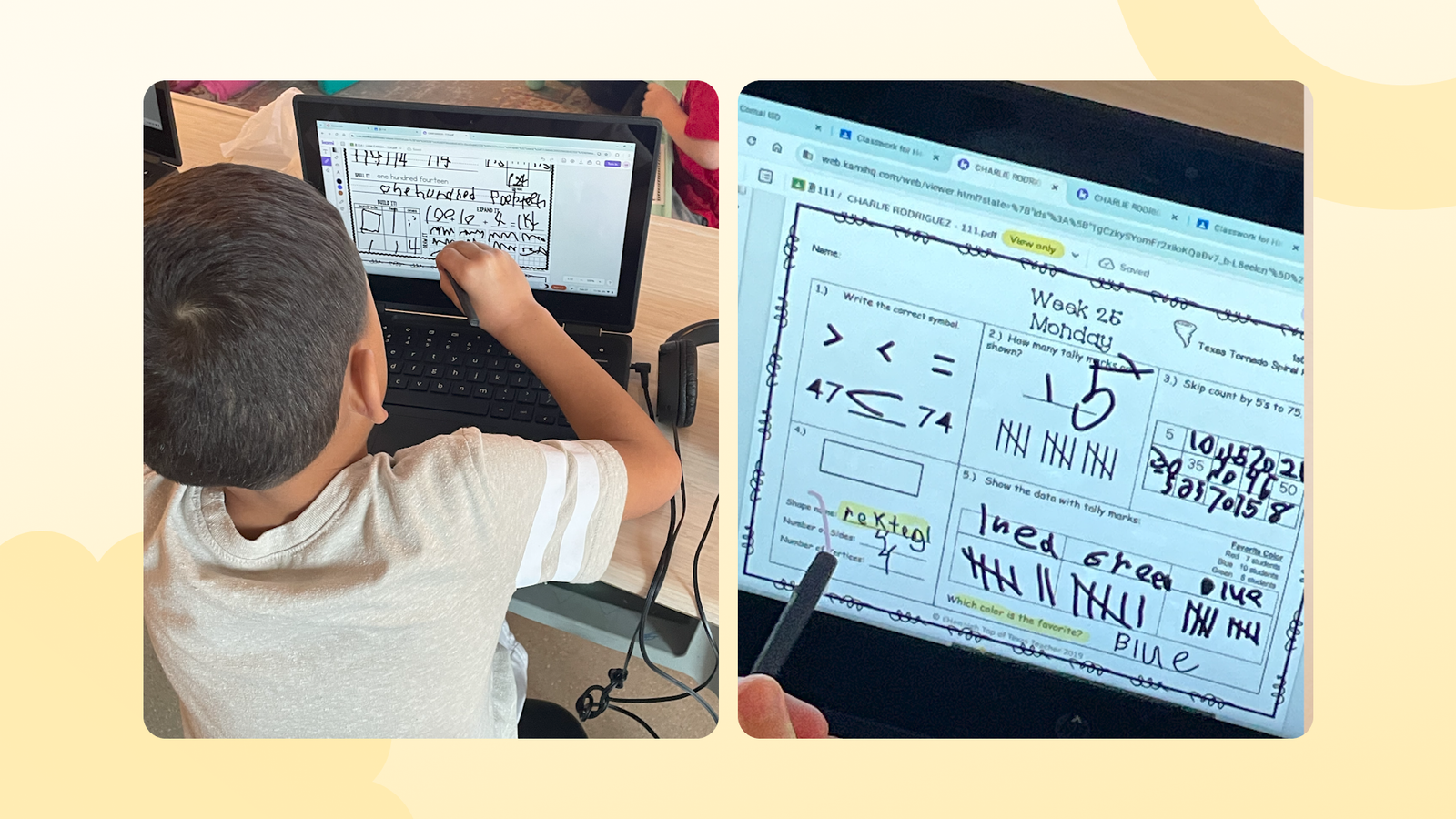
Engagement is not students clicking through tabs. In a Kami and Book Creator classroom, it is active and visible. A student might use the draw tool to work through a math problem, highlight key evidence in a text, or add notes on a new page.
Part of that comes from choice. Not every student wants to annotate or highlight. Some prefer to draw, circle, or use shapes to explain their thinking. Giving students more than one way to respond is what surfaces the thinking.
Across Comal ISD, students’ top three Kami tools are the textbox, drawing tool, and eraser—writing, sketching, and reworking their thinking all in the same document.
Teachers can see that thinking as it happens. Instead of waiting until after class to grade, they can monitor progress through the teacher dashboard in Class View, spot misconceptions early, and give feedback while students are still working.
Video comments go a step further. When a student records themselves explaining an answer, the teacher gets evidence of understanding, not just a completed task.
“If you can explain it, you understand it, and the teacher knows that you understand it,” Jillian says. “Nowadays it’s surface level. We want to go beyond the surface level. We want students to be able to explain their thinking.”
That matters beyond the classroom. Students who can explain their reasoning out loud are practicing the same skill they will need in college, career, or the military.
How teachers use Kami for STAAR and EOC test practice
Real-time visibility is especially useful during test preparation. Rather than build new materials, teachers across the district take their existing curriculum and adapt it in Kami so students get built-in practice for STAAR and End-of-Course (EOC) exams.
In one seventh-grade English language arts unit on theme and perception, a digital learning specialist embedded clips from TV shows students already knew directly into a Kami document. Students responded in writing in the same document, practicing Short Constructed Responses (SCRs) and Extended Constructed Responses (ECRs), while the teacher watched the work develop.
Test preparation did not have to feel like a separate, high-pressure event. It became part of the learning students were already doing.
Digital collaboration teachers can monitor
One thing Jillian noticed early was that the way students were working did not resemble how they would work later.
Kami’s shared documents and comments gave her a way to close that gap. Students hold conversations with each other inside a document, and teachers approve comments and remove anything off-topic. Students learn they are responsible for what they put in a comment box, in an environment where a teacher can still step in.
It is low-stakes practice for something students will do constantly later: respond to a colleague in writing, in a shared workspace, in a way that stays respectful and on-topic.
From annotation to published work: Book Creator in K-12
Kami makes the thinking visible while it’s happening. Book Creator is where that thinking becomes something students can share.
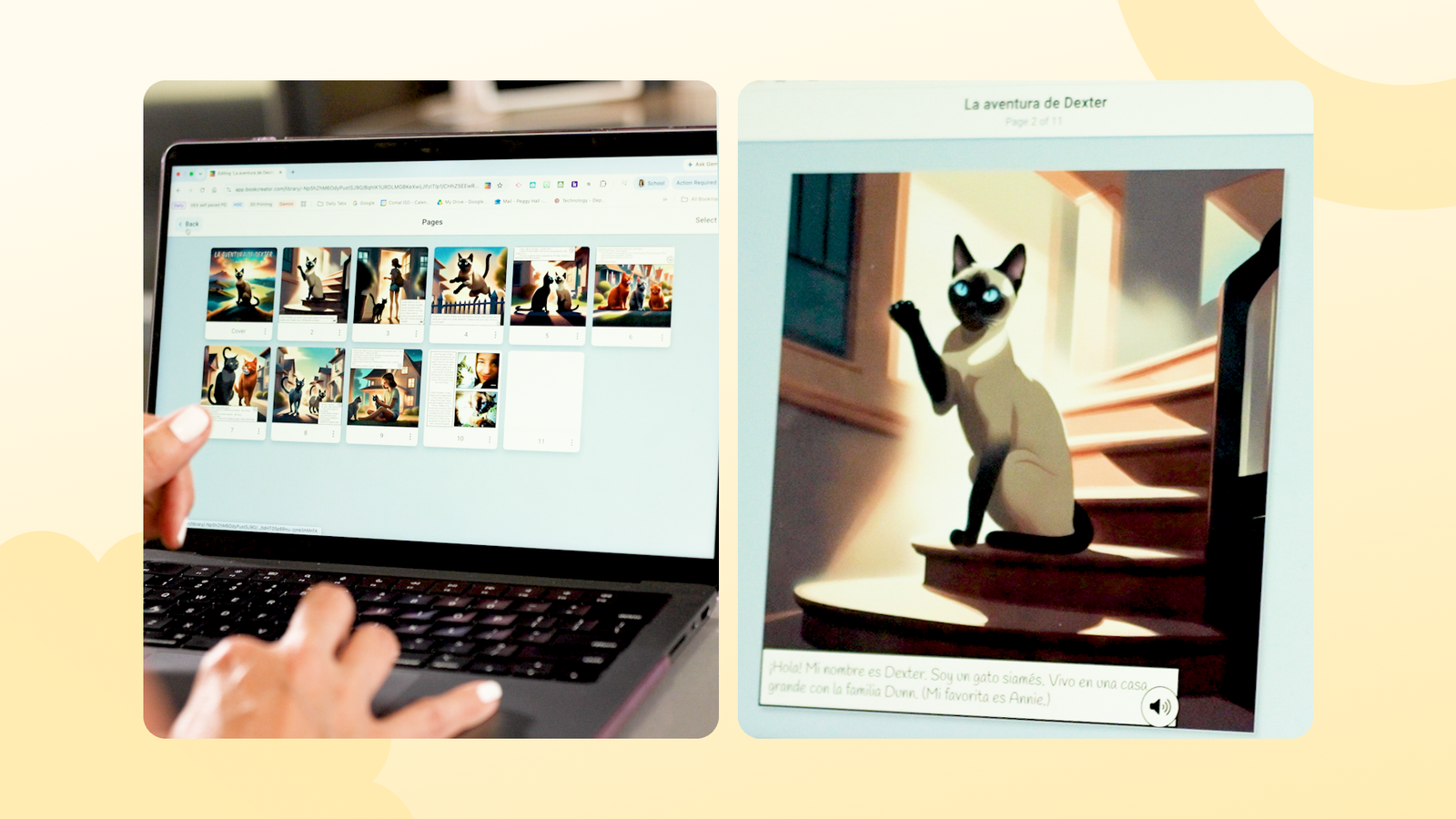
In a middle school Spanish class, students took an annual project, writing and illustrating an original children’s story, and built it in Book Creator. They drew their own illustrations, wrote the text in Spanish, and recorded themselves reading the stories aloud.
Instead of hand-delivering a physical stack of paper to one school, the teacher shared a digital library across multiple elementary campuses. Students in the district’s dual-language classrooms could turn the pages of interactive books while listening to middle school students read fluently in Spanish. When the team showed that finished digital library to the district CIO, the depth of student work helped make the case for bringing Book Creator district-wide.
That same sense of ownership shows up in elementary classrooms. During Halloween week, a fourth-grade teacher had students write spooky stories in Book Creator. After publishing, students used Book Creator’s analytics feature to look at a map and see that people in multiple states and countries were reading their work. A seasonal writing prompt became a moment of genuine author pride.
Because both tools run K-12, students are not starting over every year. As elementary digital learning specialist Peggy Hall puts it, that compounds.
“They’re starting with doodles and shapes as kindergartners, and then doing really elaborate projects as seniors,” Peggy says. “After those first few years, 100% of their effort goes to creating with the tool, not learning how to use the tool.”
How to roll out edtech across 36 campuses with four specialists
This is where many district rollouts often fail. When Kami launched, Comal ISD had four digital learning specialists covering 36+ campuses across 589 square miles. In the first year of secondary implementation, one specialist covered 16 campuses. He got there by leaning on librarians and tech-confident teachers to carry the tool into classrooms he could not reach.
So the team kept the rollout practical. They met teachers where they were, in small and frequent sessions, and gave them something they could use in class immediately.
- Start with what teachers already use
- Work with existing curriculum
- Offer small, frequent support
- Demo teach alongside the teacher
“She sees how quickly her students pick up the tool, and it helps her feel more comfortable with it. ‘Oh, I can do this. This isn’t as hard as I thought it was going to be,’” Peggy explains. “The teacher across the hall hears and sees what her students have created, and I’m often asked to come back the following week.”
Where the digital specialist team could not physically reach, teacher leaders carried the work. The district leans on a network of teacher leaders, librarians, and tech-confident teachers who advocate for the tools and show peers how they’re using them.
And it worked. Student usage grew three times faster than teacher usage—driven by the same teachers bringing more of their classes on board as they experienced the value.
“In education, that’s always a trend. It’s ‘just one more thing,’” Jillian says. “But it’s not just one more thing when it’s intentional. It’s not just one more thing when it has purpose in your classroom.”

The takeaway for other districts
Jillian Pratt keeps her advice to other school leaders simple:
“If a district asked me how to get teachers and students engaged with tools like Kami and Book Creator, I’d say the first place to start is in the classroom. Find the teachers who already have buy-in, show them how the tool can benefit their classroom, and it will grow like wild fire across your district.”
Comal ISD’s approach worked because every decision was made with intention. Which tools to buy, which teachers to start with, and how to support them — each one traced back to what students were meant to be learning.
Kami and Book Creator gave teachers practical ways to make that learning visible, creative, and easier to build on year after year.
See how Kami supports districts making intentional edtech decisions.
Blogs you may also like
Author study ideas you can run in a 30-minute block

National Family Literacy Month ideas for home and school
Book Creator’s new classroom writing tool puts formatting controls where students can actually use them