


Digital citizenship for students is one of those topics that sounds simple until you try to teach it to a six-year-old. Tell a first grader to “be kind online” and they’ll nod. Show them a character whose research project gets a mean comment, and they’ll have opinions for the rest of the period.
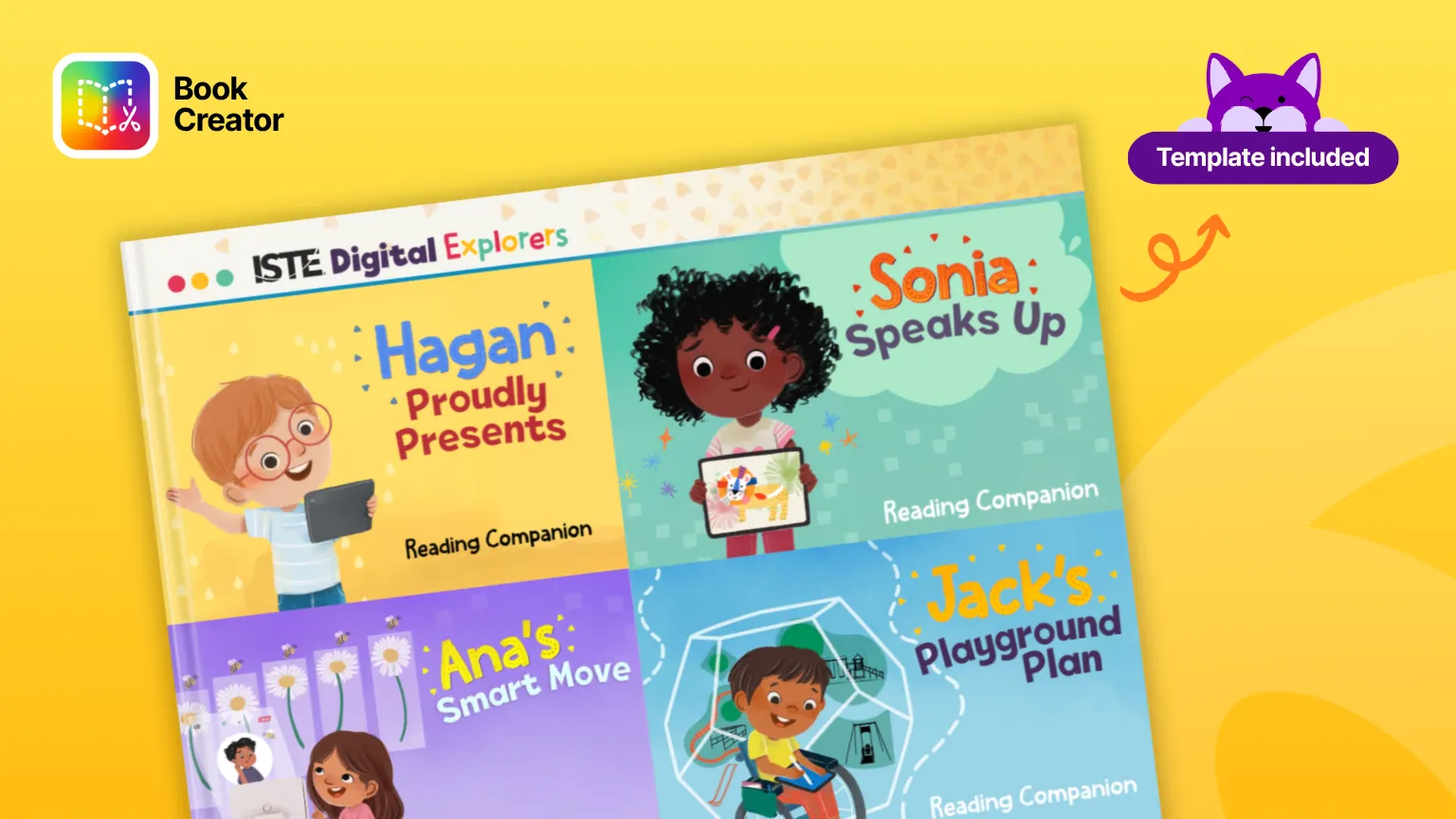
That’s the bet behind Shannon McClintock Miller’s ISTE (International Society for Technology in Education) Digital Explorers series, a partnership between Capstone and ISTE. Each of the seven ISTE Student Standards gets its own early chapter book and its own character, so students meet digital citizenship, AI literacy, and computational thinking through a story rather than a definition.
Why digital citizenship for students works better as a story
Most digital citizenship curricula are built around scenarios, and for good reason: the skill being taught is judgment, not recall. A student who can recite a rule about online kindness hasn’t necessarily learned anything transferable. A student who watched a character they like get a hurtful comment, and then had to decide what that character should do next, has practiced the actual thinking.
Stories also solve the timing problem. Digital citizenship rarely gets its own unit. It gets a week in October, or fifteen minutes wedged into a research lesson. A short chapter book with a built-in companion activity fits that reality better than a standalone curriculum you’d need to schedule around.
Four books for teaching digital citizenship for students
Four of the series are covered below, each mapped to a different standard, and each with its own remixable companion in Book Creator and its own matching template in the Kami library.
Sonia’s Digital World centers on kids as digital citizens who can speak up for themselves and their friends. The Book Creator reading companion extends the story into classroom activities, and the matching Sonia’s Gallery Walk template in Kami gives students a structured way to showcase their own work and give each other feedback using the TAG strategy: tell your classmate something you like, ask a question, give a suggestion.
Jack’s Playground Plan follows Jack as he plans and builds a playground, leaning into engineering and STEM (science, technology, engineering, and math) thinking. Its Book Creator companion includes book-specific research and design prompts, paired with Jack’s own Kami activity built around the same project-planning thinking.
Hagan Proudly Presents is about a research project that goes public, comments included, some kind and some not. It’s the one Miller singles out when she talks about the series, and for good reason: it opens a real conversation about being kind online before it ever becomes a problem. Students research an animal project using the Kami template Our Research Adventure, then move into the Book Creator companion to build a favorite-animal presentation with text, images, video, and drawings, plus the standalone Madison’s Presentation Template in Kami for any presentation project that needs the same simple structure.
Ana’s Smart Move is the computational thinking and coding entry in the series. Its Book Creator companion includes book-specific small-group prompts, and the matching problem-solving activity in Kami gives students practice breaking a task into ordered steps, the same logic underneath any coding lesson, without touching a line of code.
The series is built to run to seven books, one per standard, so check the full lineup for the most recent additions and their companions.
How this maps to the literacies you’re teaching
The Future Ready Librarian movement’s updated framework widened a single “literacy” pillar into “literacies,” naming AI literacy, digital citizenship, and media literacy directly instead of leaving them implied. We covered that shift in more depth in our post on the librarian portfolio, if you want the fuller context.
The Digital Explorers series maps onto that shift more directly than most library resources do. Digital citizenship shows up explicitly in Hagan’s story about online comments and Sonia’s about speaking up. Computational thinking, the foundation AI literacy sits on top of, is the whole premise of Ana’s book. And Miller’s own working definition of AI literacy has three parts: students should be able to understand these tools, use them, and question them responsibly, treating AI as a creative partner rather than something to consume passively, with real conversations about ethics running alongside. That’s a harder thing to teach from a slide deck than from a story a six-year-old already cares about.
A low-stakes way to start with AI, if you haven’t yet
Miller’s own example is worth stealing directly: a first-grade class drew a picture, uploaded it into Book Creator, then used the Adobe Express integration inside Book Creator to generate a writing prompt around what they’d drawn. The drawing came first. The AI tool responded to the student’s own idea instead of generating one for them. It’s a small, concrete way to show both students and hesitant teachers what these tools can do without it feeling like a leap.
Turn student responses into portfolio evidence
If you’re building a librarian portfolio to show your program’s impact this year, a student’s Book Creator response to one of these units is a strong, specific entry. It’s tied directly to a named ISTE standard, it’s student voice rather than a summary of an activity, and it covers exactly the literacies your framework is now asking you to show evidence for.
Getting started
Search the Discover tab in Book Creator for the ISTE Digital Explorers companions, or browse them together on the Book Creator ISTE Digital Explorers page. For the Kami side, search the Kami Library for the individual template names above, or look for Shannon Miller’s collection there. Remix what fits, trim it to the one or two pages you need for a first lesson, and build from there the same way you would with any other template in your library.
Frequently asked questions
Digital citizenship covers the judgment and habits students need to act responsibly online: how they treat other people, how they handle their own information and reputation, how they evaluate what they read, and increasingly, how they use AI tools. It’s less a body of facts than a set of decisions students practice making, which is why scenario-based and story-based approaches tend to stick better than rules on a poster.
As soon as students are using devices, which in most schools now means kindergarten. The content changes more than the timing does. With younger students, digital citizenship looks like kindness in comments, asking permission before sharing, and knowing which adult to tell when something feels wrong. With older students it extends into digital footprint, source evaluation, and the ethics of AI use. The Digital Explorers books are written for early readers, which is what makes them useful for the youngest end of that range.
AI literacy is best understood as the newest branch of digital citizenship rather than a separate subject. The underlying questions are the same ones digital citizenship has always asked: where did this come from, who made it, can I trust it, and what’s my responsibility in using it. That’s why the updated Future Ready Librarian framework groups them together under “literacies” instead of treating AI as its own pillar.
The ISTE Student Standards are seven standards published by the International Society for Technology in Education describing the skills students need to learn effectively with technology. They cover areas including digital citizenship, computational thinking, creative communication, and knowledge construction. The Digital Explorers series is built with one book per standard.
The Book Creator companions and Kami templates are designed to extend each story, so they work best alongside the book. That said, several of the activities stand on their own as digital citizenship lessons, particularly the presentation and gallery walk templates, which don’t depend on a specific plot point. If you’re deciding whether to buy the set, remixing a companion first is a reasonable way to see whether the approach fits your students.
Blogs you may also like
Your March Classroom Activities, Planned

Summer Reading Resources: Journals, Author Studies, and More
April Classroom Resources: End-of-Year Energy That Actually Inspires